Usage Guide
This guide provides detailed examples of how to use HAPIClient.jl to access heliophysics data from HAPI servers.
Basic Usage
Listing Available Servers
Start by exploring what HAPI servers are available:
using HAPIClient

# List all available HAPI servers
servers = hapi()
22-element Vector{SubString{String}}:
"https://cdaweb.gsfc.nasa.gov/hapi"
"http://hapi-server.org/servers/SSCWeb/hapi"
"https://amda.irap.omp.eu/service/hapi"
"https://csatools.esac.esa.int/HapiServer/hapi"
"https://iswa.gsfc.nasa.gov/hapi"
"https://vires.services/hapi"
"https://imag-data.bgs.ac.uk/GIN_V1/hapi"
"https://api.phys.ucalgary.ca/hapi"
"https://www.ncei.noaa.gov/cloud-access/space-weather-portal/api/v1/hapi"
"https://wdcapi.bgs.ac.uk/hapi"
⋮
"https://api.helioviewer.org/hapi/Helioviewer/hapi"
"https://planet.physics.uiowa.edu/das/das2Server/hapi"
"https://hapi-server.org/servers-dev/URLWatcher/hapi"
"http://hapi-server.org/servers/TestData2.0/hapi"
"http://hapi-server.org/servers/TestData2.1/hapi"
"http://hapi-server.org/servers/TestData3.0/hapi"
"http://hapi-server.org/servers/TestData3.1/hapi"
"http://hapi-server.org/servers/TestData3.2/hapi"
"http://hapi-server.org/servers/TestData3.3/hapi"Getting Dataset Catalogs
A server is a registry of its catalog: keys lists dataset ids, and server[id] is a dataset.
filter(contains("AC_H0"), keys(CDAWeb))2-element Vector{String}:
"AC_H0_MFI"
"AC_H0_SWE"Dataset Information
keys lists a dataset's parameter names; getmeta(ds) returns the HAPI info response, and getmeta(ds[name]) one parameter's entry.
ds = CDAWeb["AC_H0_MFI"]
keys(ds)
6-element Vector{String}:
"Magnitude"
"BGSEc"
"BGSM"
"dBrms"
"SC_pos_GSE"
"SC_pos_GSM"getmeta(ds)JSON.Object{String, Any} with 7 entries:
"HAPI" => "2.0"
"resourceURL" => "https://cdaweb.gsfc.nasa.gov/misc/NotesA.html#AC_H0_MFI"
"contact" => "N. Ness @ Bartol Research Institute"
"parameters" => Any[Object{String, Any}("name"=>"Time", "length"=>24, "units…
"startDate" => "1997-09-02T00:00:12Z"
"stopDate" => "2026-08-31T23:59:54Z"
"status" => Object{String, Any}("code"=>1200, "message"=>"OK")getmeta(ds["Magnitude"])JSON.Object{String, Any} with 5 entries:
"name" => "Magnitude"
"description" => "B-field magnitude"
"units" => "nT"
"type" => "double"
"fill" => "-1.0E31"Data Retrieval and Access
Basic Data Download
ds[name] fetches one parameter as a HAPIVariable; ds[names] fetches several in one request as HAPIVariables.
using Dates

tmin = DateTime(2001, 1, 1, 5, 0, 0)
tmax = DateTime(2001, 1, 1, 6, 0, 0)

Magnitude = getdata(ds["Magnitude"], tmin, tmax)
HAPIVariable{Float64, 1, Vector{Float64}, Vector{Durations.Timestamp{Dates.Nanosecond}}, SpaceDataModel.SchemaDict{HAPIClient.HAPISchema, String, Any, JSON.Object{String, Any}}}: Magnitude
Time Range: 2001-01-01T05:00:14 to 2001-01-01T05:59:58
Units: nT
Size: (225,)
Memory Usage: 3.903 KiB
Metadata:
name: Magnitude
description: B-field magnitude
units: nT
type: double
fill: -1.0E31data = getdata(ds[["Magnitude", "BGSEc"]], tmin, tmax)HAPIVariables: CDAWeb/AC_H0_MFI (https://cdaweb.gsfc.nasa.gov/hapi/data?parameters=Magnitude%2CBGSEc&id=AC_H0_MFI&time.max=2001-01-01T06%3A00%3A00.000Z&format=csv&time.min=2001-01-01T05%3A00%3A00.000Z)
Magnitude [Time Range: 2001-01-01T05:00:14 to 2001-01-01T05:59:58, Units: nT, Size: (225,)]
BGSEc [Time Range: 2001-01-01T05:00:14 to 2001-01-01T05:59:58, Units: nT, Size: (225, 3)]
Metadata - SpaceDataModel.NoMetadata()Accessing Retrieved Data
var = data["BGSEc"]HAPIVariable{Float64, 2, Matrix{Float64}, Vector{Durations.Timestamp{Dates.Nanosecond}}, SpaceDataModel.SchemaDict{HAPIClient.HAPISchema, String, Any, JSON.Object{String, Any}}}: BGSEc
Time Range: 2001-01-01T05:00:14 to 2001-01-01T05:59:58
Units: nT
Size: (225, 3)
Memory Usage: 7.671 KiB
Metadata:
size: Any[3]
name: BGSEc
description: Magnetic Field Vector in GSE Cartesian coordinates (16 sec)
units: nT
type: double
fill: -1.0E31Retrieve the values
values = parent(var)225×3 Matrix{Float64}:
-3.588 0.2 -2.425
-3.534 0.149 -2.42
-3.543 0.14 -2.427
-3.581 0.067 -2.47
-3.536 0.062 -2.463
-3.557 0.063 -2.452
-3.557 0.02 -2.429
-3.593 0.04 -2.409
-3.655 -0.017 -2.396
-3.596 0.073 -2.406
⋮
-3.895 0.251 -2.019
-3.877 0.229 -2.036
-3.934 0.285 -2.028
-3.781 0.283 -2.074
-3.792 0.328 -2.15
-3.831 0.333 -2.123
-3.528 0.03 -2.519
-3.398 0.072 -2.647
-3.454 0.044 -2.663Retrieve the timestamps
timestamps = times(var)225-element Vector{Durations.Timestamp{Dates.Nanosecond}}:
2001-01-01T05:00:14
2001-01-01T05:00:30
2001-01-01T05:00:46
2001-01-01T05:01:02
2001-01-01T05:01:18
2001-01-01T05:01:34
2001-01-01T05:01:50
2001-01-01T05:02:06
2001-01-01T05:02:22
2001-01-01T05:02:38
⋮
2001-01-01T05:57:50
2001-01-01T05:58:06
2001-01-01T05:58:22
2001-01-01T05:58:38
2001-01-01T05:58:54
2001-01-01T05:59:10
2001-01-01T05:59:26
2001-01-01T05:59:42
2001-01-01T05:59:58Retrieve the metadata
metadata = getmeta(var)SpaceDataModel.SchemaDict{HAPIClient.HAPISchema, String, Any, JSON.Object{String, Any}} with 6 entries:
"size" => Any[3]
"name" => "BGSEc"
"description" => "Magnetic Field Vector in GSE Cartesian coordinates (16 sec)"
"units" => "nT"
"type" => "double"
"fill" => "-1.0E31"Working with Different Servers
CSA Example
# Example with CSA (Cluster Science Archive) server
tmin = DateTime(2001, 6, 11, 0, 0, 0)
tmax = DateTime(2001, 6, 11, 0, 1, 0)
data = getdata(CSA["C4_CP_FGM_FULL"][["B_vec_xyz_gse", "B_mag"]], tmin, tmax)
INTERMAGNET Example
# Example with INTERMAGNET server (datasets with slashes in names)
tmin = DateTime(2001, 6, 11, 0, 0, 0)
tmax = DateTime(2001, 6, 11, 0, 1, 0)
data = getdata(INTERMAGNET["aae/definitive/PT1M/xyzf"]["Field_Vector"], tmin, tmax)
Data Analysis
The retrieved data integrates well with Julia's ecosystem:
using CairoMakie

f = Figure()
for (i, var) in enumerate(data)
    m = getmeta(var)
    ax = Axis(f[i,1]; ylabel=m["name"], title=m["description"])
    t = DateTime.(times(var))  # Makie time axes do not support Timestamp yet
    for c in eachcol(var)
        lines!(t, c)
    end
    i != length(data) && hidexdecorations!(; grid=false)
end
f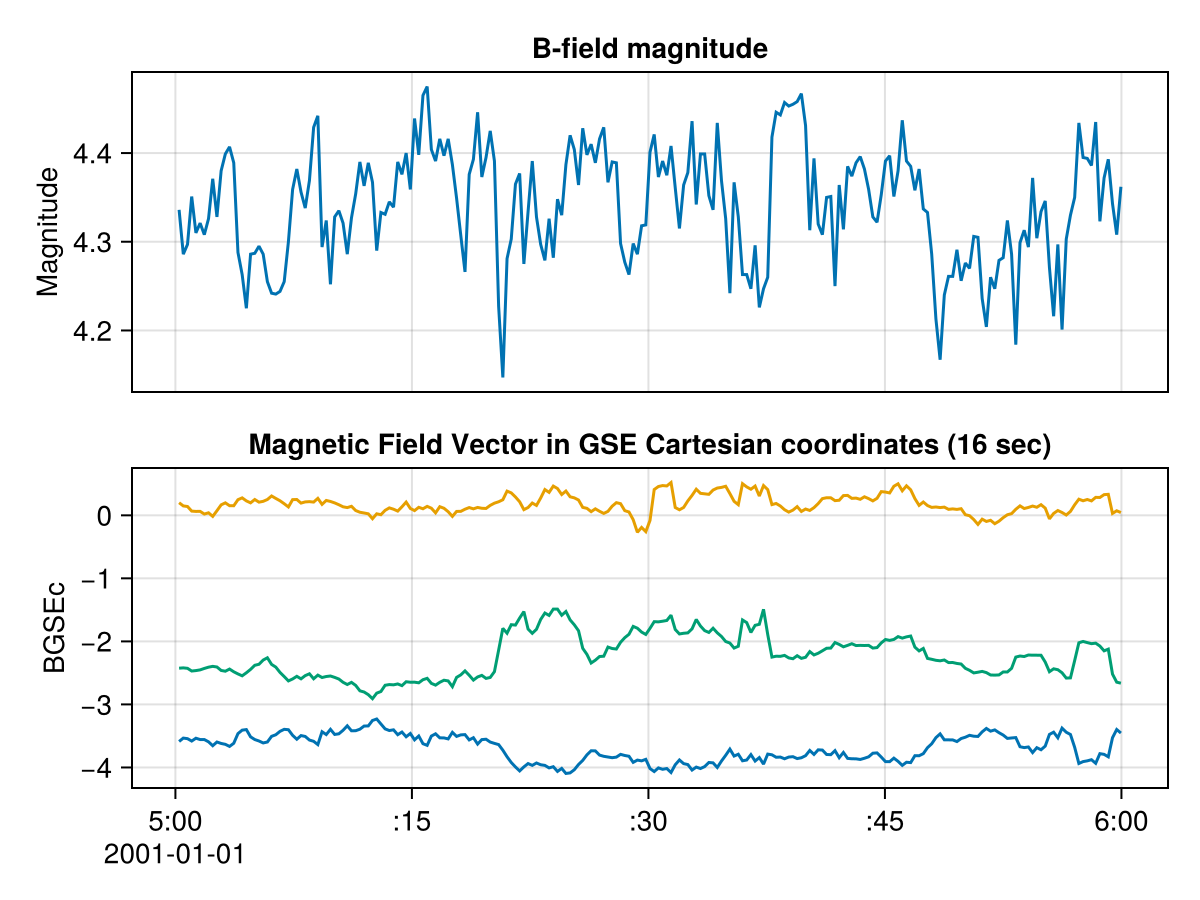
For advanced visualization capabilities, HAPIClient.jl works well with the SPEDAS.jl ecosystem. See the SPEDAS.jl quickstart guide for detailed visualization examples.